
When processing card transactions through GymOwners.com, various responses can be returned, each indicating the status of the transaction. Understanding these responses is key to resolving issues quickly and ensuring that your clients' transactions are processed smoothly. These failed reasons can be found on the contat's profile -> payments tab -> past payment history.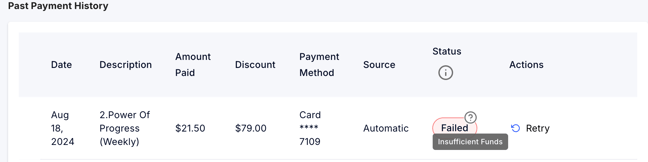
We've created a handy reference table that explains the most common transaction responses you might encounter. This table provides a brief description of each response, along with recommended next steps to help you address the issue effectively.
Why Transaction Responses Matter
When a transaction is processed, it goes through several layers of security checks and validations, including verification with the card issuer. Sometimes, these checks result in declined transactions or other types of errors. These responses help you understand what went wrong and what actions you or your client can take to resolve the issue.
Common Causes for Transaction Responses
- Cardholder Issues: Insufficient funds, expired cards, or restrictions set by the cardholder or their bank.
- Technical Problems: System errors, network unavailability, or communication issues with the card issuer.
- Security Concerns: Suspicious activity or unauthorized use, which can trigger declines or requests for further identification.
For more detailed guidance, check out the full table below:
|
Transaction Status |
Explanation |
Next Steps |
|
Declined |
The transaction was not approved by the card issuer. This is the most generic error code and could be due to various reasons such as suspicious activity, etc. |
Contact your client to use a different payment method or have your client contact their card issuer for details for next steps. |
|
Exceeds Approval Amount Limit |
The transaction amount exceeds the cardholder’s preset spending limit. This could happen if the purchase is unusually large. |
Have the client contact their bank to adjust their limit and then re-run the transaction after the limit is adjusted. |
|
Insufficient Funds |
There aren't enough funds in the client's account to cover the transaction. This can happen often with debit cards. |
Ask the client to use another payment method or deposit more funds. |
|
Corporate client Advises Not Authorized |
The business client did not authorize the transaction. This can occur if the charge was unexpected or incorrect. |
Confirm with the client and ask them to have their work authorize the transaction. |
|
Processing Network Unavailable |
The payment network is temporarily down, possibly due to maintenance or a technical issue. |
Wait a few minutes and try the transaction again. |
|
Issuer Unavailable |
The card issuer's system could not be reached, often due to network issues or maintenance on their end. |
Wait a few minutes and try the transaction again. |
|
Re-submit Transaction |
The transaction wasn't processed correctly the first time, possibly due to a system issue. |
Simply retry the transaction. |
|
Call Issuer |
The card issuer needs to be contacted for more details on why the transaction failed. |
Have the client contact their card issuer for further assistance and next steps. |
|
Issuer Generated Error |
The card issuer reported an unspecified error, which could be due to internal system issues on their side. |
Wait a few minutes and try the transaction again. |
|
Restricted Card |
The card has usage restrictions, which might be due to limits set by the cardholder or the issuing bank. |
Advise the client to contact their card issuer to lift restrictions. |
|
Card Not Active |
The card hasn’t been activated yet, so it can’t be used for transactions. |
Have the client activate their card or use a different one. |
|
Illegal Transaction |
The transaction isn't allowed under the cardholder's agreement, possibly due to regulatory reasons or card type limitations. |
Ask the client to contact their issuer or try a different payment method. |
|
Duplicate Transaction |
The same transaction was attempted more than once in a short period, triggering a block. |
Verify if the transaction already went through before retrying. |
|
System Error |
There was a technical issue in the transaction process, possibly related to the payment processor or the network. |
Wait a few minutes and try the transaction again. |
|
System Error (cannot process) |
A system error prevented the transaction from being processed, potentially due to an issue with your payment processor. |
Wait a few minutes and try the transaction again. |
|
Lost/Stolen Card |
The card was reported lost or stolen, so transactions are automatically blocked for security. |
Advise the client to use a different payment method or report the card as found if legitimate. |
|
Expired Card |
The card has expired and can no longer be used for transactions. |
Advise the client to use a different payment method |
|
No such issuer |
The card issuer doesn't exist or can’t be identified, often due to incorrect card details being entered. |
Verify the card details with the client and try again. Alternatively, advise the client to use a different payment method |
|
Cardholder transaction not permitted |
The cardholder's bank has restricted this type of transaction, possibly due to their account settings or card type. |
Ask the client to contact their card issuer. |
|
Cardholder requested that recurring or instalment payment be stopped |
The client requested to stop future recurring payments or instalments, which automatically blocked this transaction. |
Confirm the situation with your client and adjust payment schedules accordingly. |
|
Do Not Honor |
The issuer did not approve the transaction, often due to account issues or suspicion of fraud. |
Ask the client to use a different card or contact their issuer for more details. |
|
Decline - Request Positive ID |
The issuer requires further identification to approve the transaction, likely due to unusual activity. |
Request a valid ID from the client and retry the transaction. |
|
Processing Network Error |
An error occurred within the payment processing network, possibly due to connectivity issues or maintenance. |
Wait a few minutes and try the transaction again. |
|
Soft Decline - Primary Funding Source Failed |
The primary payment method failed, possibly due to insufficient funds or a temporary issue with the card. |
Ask the client to retry the transaction or use a different payment method. |
|
Soft Decline - Auto Recycling In Progress |
The system is automatically retrying the transaction, often due to a temporary issue. |
No action needed; the system will retry the transaction. |
|
Generic Decline |
The transaction was declined for an unspecified reason, which could be due to multiple factors. |
Contact your client to use a different payment method or have your client contact their card issuer for details for next steps. |