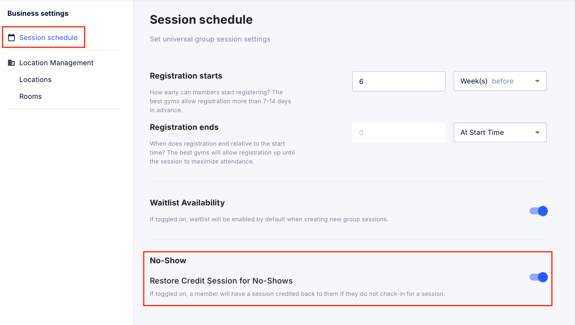
GymOwners.com gives you more flexibility in managing class attendance. With this update, you can choose whether or not a credit is deducted when a member misses a scheduled class or session. This helps tailor your cancellation policies to best fit your gym.
Step 1: Navigate to Business Settings
- Log in to your GymOwners.com account.
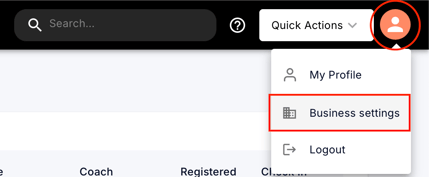
- In the top-right corner of the dashboard, click on the person icon.
- From the dropdown menu, select Business Settings.
Step 2: Access Session Schedule Settings
- Within Business Settings, click on Session Schedule on the left.
- No-Show: toggle on the “Restore Credit Sessions for No-Shows” option to allow sessions to be credited back to members if they do not check-in for a session.